Need to change the boot order for your Windows 7, Vista or XP Computer? By changing the boot order, you can force your computer to boot from a CD/DVD drive.
Changing the boot order on a PC is mostly done in order to boot from a recovery disk, an OEM (original equipment manufacturer) disk or to install / re-install Windows OS.
To change the boot sequence for a PC:
The first thing you have to do is restart your computer. You can enter the BIOS when you see a message such as “Press ESC to enter setup” or something similar.
![]()
Got to Advanced BIOS Features or Advanced Boot Options. In the above screenshot, it’s under Advanced BIOS Features. Use the arrow keys to navigate.
![]()
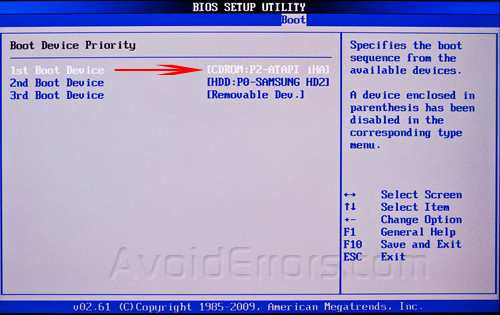
As you can see, there is a First, Second and Third Boot Device. Scroll down and use the arrow keys to change the device to HDD (hard drive), Floppy, CD ROM, or Network.
You could also have a BIOS that looks like this:
![]()
The instructions for changing the boot order are in the sidebar, but usually it requires pressing the + or – buttons to move items up and down in the order list. The first item in the list is what will be scanned first when booting. If boot media is not found, it will try the second device and so on.
Finally, go to Exit and make sure you choose Yes to the Save configuration changes and exit now? question.
![]()
That’s it! If you have any questions or can’t get into the BIOS on your computer, post a comment here and I will try to help!
Comments
hi, how can i install back my windows 7 starter on my acer aspire D257, after i install windows8, because i much likely the w7 than w8,. i have my dvd recovery
My emachine will not go any farther than to the emachine window when I turn it on and the light that blinks on the tower is not blicking. What can I do to get it to work? Thank you I have windowXp
did u made sure you are using the proper win XP 32 bit or 64 bit?
hi
i tried to install win7 from bootable usb but my laptop is not recognizing my usb. i tried it on my friend system it works. i am using ubuntu 12.04 lts now. i didn’t know what to do.
did you enable the first boot device to be the usb in the Bios?
which of the Home keys will take me to Advance Bios I;m using win7-Home premium
when you boot the computer it tell’s you
Really your every video is very useful. Thank you very much for teaching us. Carry on for us.